
Monitor Setup
All photos on MarkRaymondMason.com are specially profiled for web viewing. You don't need a special computer to see them properly, but unusual monitor settings might make my photos look strange.
Adjust your monitor or hold your device so you're looking at it squarely. Ideally, try to look at this website inside, away from bright light that can reflect off your screen.
If your monitor has the controls, adjust the brightness and contrast settings until you see 24 distinct rectangles in the image below. When in doubt, choose the brighter, higher contrast setting.
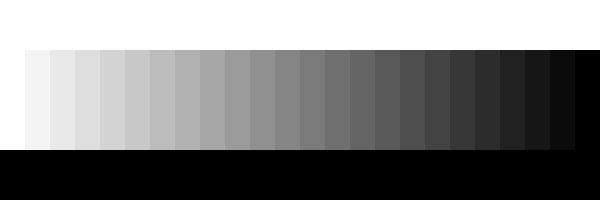
Set your screen resolution as high as possible. In a conventional web browser, choose to view the site full screen, often by pressing F11. Make your screen as bright as possible.
If you're a fellow photographer or graphic designer, you may have calibrated your monitor. While you're browsing my site, turn your calibration off – my photos were intended to be viewed on a typical, un-calibrated panel.
Keep in mind that no web photo can match the detail, colour depth, or tonal range of a fine art photographic print. Enjoy my photography galleries!